


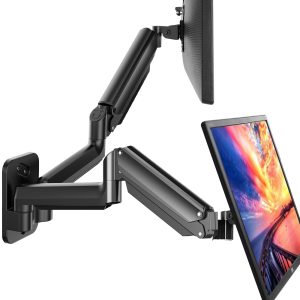
- Brand: ErGear
- Material: Aluminium
- Colour: Schwarz
Overview
The ErGear Single Monitor Arm Desk Mount 13-34 is designed to enhance your workspace by providing a flexible and ergonomic solution for 13-34″ screens. With its adjustable height and fully articulating joints, this monitor arm allows users to tilt, swivel, and rotate their screens for optimal viewing comfort, making it ideal for both home and office environments.
This monitor arm is perfect for anyone looking to maximise their desk space while reducing shoulder and neck strain. Whether you’re working on a project, gaming, or enjoying multimedia content, the ErGear Single Monitor Arm Desk Mount ensures that your monitor is positioned at the right height and angle for a more productive and enjoyable experience.
Key benefits
- Supports monitors from 13″ to 34″ with a maximum load of 10 kg.
- Height adjustable up to 44.5 cm for optimal viewing comfort.
- Fully adjustable joints for easy tilting, swivelling, and rotation.
- Designed to alleviate shoulder and neck pain by raising your monitor.
- Space-saving design maximises desktop space utilisation.
- Compatible with VESA mounts (75x75mm, 100x100mm).
- Easy three-step installation for quick setup.
- Adjustable tension to securely hold monitors below 10 kg.
- Stable construction ensures reliable support for your monitor.
How to use
- Begin by selecting a suitable location on your desk for the ErGear Single Monitor Arm Desk Mount.
- Use the C-Clamp or Grommet Base to securely attach the monitor arm to the edge of your desk, ensuring it is stable and properly positioned.
- Adjust the pneumatic spring tension according to the weight of your monitor, ensuring it can support your device safely.
- Attach your monitor to the arm, ensuring it is compatible with the VESA mount specifications (75*75mm or 100*100mm).
- Once the monitor is mounted, adjust the height, tilt, and swivel to achieve your desired viewing angle and comfort.
- Regularly check the stability of the mount and make any necessary adjustments to the tension as needed.
Compatibility
- Compatible devices: Monitor
Specifications
- Compatible devices: Monitor
- Manufacturer: ErGear
- Material: Aluminium
- Maximum tilt angle: 90 Degrees
- Mounting type: Tabletop Mount
- Movement type: Articulating
- Package Dimensions: 40.79 × 21.41 x 10.59 cm
- Weight: 2.38 kg
FAQs
What is the maximum weight this monitor arm can support?
The monitor arm can support a maximum weight of 10 kg.
What monitor sizes are compatible with the ErGear Single Monitor Arm Desk Mount?
This monitor arm is compatible with monitors ranging from 13 to 34 inches.
How do I adjust the tension for my monitor?
You can adjust the pneumatic spring to the proper tension according to your monitor’s weight after installing the arm.




Jaskomal Rai –
The monitor arm does the job but can be fussy. It was hard to set up, so you might need two people to assemble it, as it kept springing back up. The clamp to attach it to the desk is really easy to use, so you can easily move the monitor wherever you want.The build quality is really good; strong metal, and adjusting is easy, as you can see in the video. It does save space for other things under the monitor, and it looks great. It’s definitely worth the price, but the setup process could be easier.
Ryan O’Leary –
This feels like a very strong and sturdy product. I’ve got a 34” widescreen mounted on it and there are no concerns with it. It’s very easy to adjust the height and rotation and lock in the desired position. My only dislike is the difficulty of getting the plastic cable routing tray unscrewed.
BrindleDog –
Versatile, sturdy, and surprisingly affordable—this ErGear arm transformed my cluttered desk into an ergonomic workspace in under 10 minutes.The package arrives with everything you need: a robust steel arm, desk-clamp and grommet mounting options, all necessary tools, and a clear instruction manual. The clamp grips securely on surfaces from 10 to 32 mm thick with zero wobble, and the grommet mount feels rock-solid once tightened.Once installed, the gas-spring mechanism holds my 27″, 7.5 kg monitor perfectly level. Adjusting height, tilt (–50° to +85°), swivel (360°), and rotation (180°) is smooth and nearly tool-free. Built-in cable clips keep cords neatly tucked along the arm, so there’s no dangling mess.ProsSolid steel construction feels durable and premiumGas-spring arm offers smooth, tool-free height and tilt adjustmentsIntegrated cable management keeps desk tidySupports VESA 75×75 and 100×100 mm mountsIncludes both clamp and grommet mounting hardwareConsInstruction sheet could be clearer on cable-routing stepsRated weight max (9 kg) may be tight for heavier ultrawide panelsOverall, the ErGear single monitor arm is a high-value pick for anyone looking to reclaim desk space and boost comfort without breaking the bank.
Qasim Alarab –
Really good
Really good stand arm. Very high quality and easy installation
Monkey –
Montage très simple
Très bon bras , il supporte depuis un moment mon écran 34 pouces en ultra wide et tout est parfait.Montage très simple
Apache –
First of all, let’s say the quality of workmanship is amazing.It went together very easily. It can accommodate VESA 100mm like my monitor has but also can accommodate 75mm too.It can mount on an edge of the table like I wanted or through the table. You can adjust the amount of force needed to keep your monitor up. Tools are supplied (except the drill bit for through table mounting but I didn’t need this)It really looks the part.If I needed another one in the future, I’ll be looking for one of these 👍It looks great and is perfect for my needs. 😁
EC –
I have a 32″ monitor and a 27″ monitor. Although it could carry my 32″ monitor, it was difficult to control the arm under the pressure of the monitor. On the other hand, it fits my 27″ monitor perfectly. I bought two and returned one.
Forza Andrea –
Tanto Ok ma un Ma
Partiamo dal presupposto che ho un video wide screen da 34 pollici (un 27 pollici con le allette come dice qualcuno) ma di peso non elevato 5,6 kg e quindi la mia opinione è riferita a queste caratteristiche, io l’ho attaccato con il sistema vesa 100 ( ci sono 4 viti dietro al monitor, 100 corrisponde alla distanza delle viti che verranno avvitate dietro il monitor con un bel rinforzo di alluminio). MA è compatibile anche con l’attacco a 75. Tutte le viti e i rinforzi sono presenti nella scatola.Detto questo Il supporto è ben fatto plastiche e stampi non presentano imperfezioni. La morsa che permette di fissare il supporto al tavolo è facile da regolare (ho usato quella e non la possibilità di bloccare la base inserendola in un buco passacavi), robusta e irrigidita da un rinforzo in alluminio. la base stessa è dotata di piedini in plastica antiscivolo. Attenzione studiate bene dove mettere la morsa perchè avvolge una parte abbastanza grande e magari sotto il tavolo avete le gambe o supporti per cavi che potrebbero rendere difficoltoso l’inserimento della stessa. Risolto quindi il primo problema basta inserire i pezzi della “giraffa” uno sulla base e uno sulla sua estensione e il gioco è fatto. Su entrambi i pezzi si trova una vite che serve per regolare la rigidità della torsione nei movimenti. Basta con una chiave a brugola (inserita nel set) stringere per rendere la torsione (il movimento orrizontale) più difficile fino al blocco totale. Esistono anche altre due tipologie di regolazione. LA prima sistemata sul secondo pezzo del supporto monitor che è una sospensione per il carico. Serve a compensare il peso del monitor e permettere di regolare in altezza il monitor stesso permettendo di fermarlo nella posizione che volete senza che cada per l’effetto della gravità. Questa sospensione ha dei limiti di carico che sono evidenziati dalla descrizione del produttore. Più compressione metterete più compensazione al carico ci sarà un pò come una bilancia fino a farlo risalire alla massima altezza se la sospensione in compressione supera il peso del monitor, quindi come dicevo prima attenzione al peso se troppo pesante il monitor non rimarrà sollevato all’altezza che avete deciso e cadrà fino ad appoggirsi al tavolo troppo poco è il monitor andrà alla sua massima estensione in altezza. Il secondo invece presente alla fine del secondo pezzo del supporto Monitor a cui si attacca il video dopo averlo collegato con gli attacchi vesa di cui abbiamo parlato prima. Questo presenta una vite per la rigidità della torsinone del video stesso che ha libertà di monvimento sia in inclinazione che in rotazione fino a far girare il monitor da orrizzontale a verticale.Ora il giudizio. il supporto per il mio Monitor presenta un ok ma anche un ma. Per il peso che deve sostenere le regolazioni risultano essere precise ed è stabile, le combinazioni sono infinite. Il ma…? Presenta un problema quando viene regolato aumentando la distanza del braccio dalla morsa quindi avvicinandolo all vostra seduta per intenderci , quindi estendendo il braccio stesso. Amplifica il movimento che si provoca scrivendo/giocando provocato dalle vibrazioni trasmesse sul tavolo. Non grandi cose ma possono infastidire qualche giocatore che magari pesta sulla tastiera con più entusiasmo. Ho affermato ma perchè bisogna ricordare la larghezza del mio monitor (34 pollici) che amplifica le vibrazioni date dalle dimensioni e bisogna considerare il tipo di tavolo. Comunque questo non compromette il mio giudizio di pienamente soddisfatto. Comodita, qualità dei componenti, e facilità di montaggio, e perchè no prezzo. Bravi
Krzysztof –
This ErGear monitor arm is a desk savior! Easy to install with clamp or grommet, holds my 27-inch monitor securely with no sag. Full articulation, tilt, swivel, height adjust, makes ergonomic positioning effortless. Cable management keeps things tidy. Gas spring is smooth and strong. Worth every penny for a cleaner, more comfortable setup.
Sara –
This Mount was used for a 24 inch gaming monitor.It is well made, very heavy and sturdy and you can adjust the height and angle of the to once fitted.We originally used this on an ikea kallax storage unit but after a few weeks the heaviness of the mount and monitor caused the kallax unit to collapse.Not a fault of the Mount but just to be mindful that when fitting to a unit or desk make sure it attached to solid wood or metal and not something that hollow.Looks great and you can keep all the wires tidy in the internal segment.
B.melodie –
Ok
Parfait
Ken –
Great for my 34” monitor
Very easy to assemble and very easy and intuitive to use. Takes up very little space in my desk. Holds up my new 34” monitor just fine with no sag. It’s got cable management channels in the arms that helps with the whole aesthetics of my desk. Very pleased.
Philip Hastings –
Very easy to set up, the horizontal and vertical and rotation is great! Seems really solid