


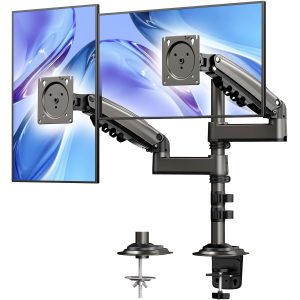
- Brand: ErGear
- Material: Stainless Steel
- Colour: Black
Overview
The ErGear Freestanding Dual Monitor Stand is designed to enhance your workspace by securely mounting two monitors ranging from 13″ to 32″. With features such as ±45° tilt, 360° rotation, and 180° swivel, this stand provides optimal viewing angles, promoting improved productivity for professionals who multitask or work from home. Its sleek black finish and sturdy stainless steel construction make it a stylish addition to any desk setup.
This dual monitor stand is ideal for anyone looking to maximise workspace efficiency, whether for gaming, graphic design, or office tasks. Its easy installation method allows for a clean and organised desk without damaging the surface, making it a practical choice for those who value both aesthetics and functionality in their work environment.
Key benefits
- Fluid adjustment with ±45° tilt, 360° rotation, and 180° swivel for flexible positioning.
- Supports two monitors simultaneously, enhancing multitasking and productivity.
- Built-in cable management keeps your workspace tidy and organised.
- Widened sturdy base design ensures stability without damaging your desktop.
- Compatible with monitors ranging from 13″ to 32″ with VESA mount patterns.
- Sleek black finish complements any office environment.
- Easy installation method allows for quick setup without desk damage.
- Encourages good sitting posture with adjustable height for optimal eye-level viewing.
How to use
- Place the ErGear Freestanding Dual Monitor Stand on a sturdy tabletop with a thickness of at least 2.5 centimetres.
- Ensure the base is stable and securely positioned before proceeding with monitor installation.
- Attach your monitors to the stand using the VESA mounting holes, ensuring they are compatible with 75x75mm or 100x100mm sizes.
- Adjust the tilt, swivel, and rotation settings to your preferred viewing angles by loosening or tightening the joints as necessary.
- Organise any cables using the built-in cable management feature to keep your workspace tidy.
- Check that all screws and adjustments are securely tightened to ensure stability during use.
Compatibility
- Compatible devices: Monitor
Specifications
- Brand: ErGear
- MPN: EGCM3-E
- Dimensions: 8.2 × 27.9 x 44.2 cm; 4.21 kg
- Weight: 4.21 kg
- Colour: Black
- Material: Stainless Steel
- Compatible devices: Monitor
- Mounting type: Tabletop Mount
- Manufacturer: ErGear
- SKU: B08C712DGL
- Brand Name: ErGear
- Enclosure Material: Stainless Steel
- Language: English
- Maximum tilt angle: 45 Degrees
- Maximum-Supported Screen Size: 32 Inches
- Minimum-Supported Screen Size: 13 Inches
- Movement type: Tilt, Swivel, Rotate
- Product Warranty: /
FAQs
What is the maximum tilt angle of the ErGear Freestanding Dual Monitor Stand?
The maximum tilt angle is 45 degrees.
What monitors are compatible with the ErGear Freestanding Dual Monitor Stand?
This stand is compatible with LCD and LED flat or curved monitors ranging from 13″ to 32″ with VESA mount patterns of 75x75mm or 100x100mm.
What materials is the ErGear Freestanding Dual Monitor Stand made from?
The stand is made from high-grade stainless steel.



astrid –
I was originally very unsure about this purchase due to the onslaught of negative reviews, they mentioned issues such as the glass being scratched, the arms being weak and unsupportive. This was completely untrue for my case and I’m vert pleased with it!The package was small but well protected with everything being tightly secured with foam and cardboard. The instructions were very useful and simple to understand with only a couple of steps to fully assembled my duel monitor step up! During the build the only issue I had was certain items were not numbered, however were easily identifiable.Once built I did have some issues getting the left arm to stop tilting the monitor but after a good amount of strength I managed to tighten it enough for it to stop dropping over time. I will say this was my only issue and a minor one at that, I found it helped to hold the monitor above or in place and then tighten the bolt rather than tighting and then moving the monitor as when the monitor moved it must have ever so slightly undone the bolt to then sink back down again. I will point out I was close to maximum weight and size as I was attaching two 32″ monitors that were 8kg heavy each. Anyone with less then I should have no issues putting this together.The stand also came with 4 wire clips to allow cables to be managed. This was a fantastic way to manage the cables and definitely an improvement over my previous set up. The middle supporting tube was hollow with a removable top, however, no optem bottom which in my opinion was a major oversight as this would have been an even better way to hide the cables.Over all, a very well designed monitor stand that managed to hold up my massive monitors. You just need a little elbow grease to get some bolts in place.I am two days into using this product, if anything changes I will be sure to update this review 🙂
MB –
As you can see from the pics the side of my desk is an open space which the OEM stand would not reach, a desk bracket wouldn’t work either because there is no edge to clamp onto. However, this sturdy based stand is rock solid and does the job with ease! A bit of a fiddle putting it together, nearly stripped one of the base screws as it is so shallow a thread but got there in the end by removing one of the washers then screwing it in so it protruded then unscrewed it, put the other washer back on and it screwed in perfectly flush! This is the only reason for knocking a star off “Easy to assemble”. The screens are not identical but I am happy with the overall look and extended view setting which makes great use for dual monitor home working. I like the simple but effective cable ties, tucking all the power and video cables neatly out of the way, as you can see they are hardly noticeable front on. The base is heavy and big and needs to be, no chance of tipping over with 2x 24″ monitors (surprised other reviews said it does!) It is a quality made product imo designed perfectly for this kind of problem. Highly recommended.
viper 360 –
I was slightly worried reading the reviews of the base shattering from screwing the screws in. Not being heavy enough to support 2 monitors and falling over. But have no clue what some people are doing with this stand worked amazingly stand is heavy as hell supports my 2 27inch monitors perfectly not a single wobble perfect fit. Base is glass and I screwed my screws in really tight and it was fine have no clue how people shattered this base it seems indestructible from my view. 10/10
William Frank Webster –
So after 16 months of having this. I ended up changing to have the stand fixed into the unit. Having 2 ASUS TUF 27Inch Monitors is great.. Not sure if I didn’t see a advisory.. But the larger the screen, the greater the weight, meaning more chance of the stand tipping over. COG (Centre of Gravity) Needs to be far back in order to reduce this from loosing the monitors. Even if you have one set back and you attempt to pull a monitor forward. Weight seems to shift in the aspect of the size of the monitors as due to the weight its more prone to tilt or become unbalanced.Price was as reasonable as the weight of the stand, the Durability and sturdy feel. Tampered glass base looked nice. If anyone is like me, I want both screens the same, not to mention the same size. But this is, more for recommendations 14″-24″.You can place a weight, or have one monitor size smaller, but it will still be unbalance the load when returning to “COG”. Any disturbance in the surrounding area could, not saying would, but affect the stands position if left unattended.So if you have both monitors the same size. As soon as you move the monitor away from the “COG” its chances of tipping over is more is guaranteed 90%.I did keep a cover on this, to reduce the amount of dust accumulated. Make sure nothing catches it. This will guarantee in falling over. Monitors ended up being scratched from tipping.
York –
My view after using this for a few months: absolutely great buy
Must admit I was a little hesitant when buying this. I had just purchased 2 full 32 inch monitors and while the product to hold them looked good I wondered how strong it would be.Having now used it full time for the last few months here are my views:1. Know what you need! I wanted something that I can from time to time move from one table to another easily and doesn’t require finding a place to screw something tightly. This solution literally allows you to just pick up the whole thing with the two monitors and move it to a different place in 1 min).2. It is incredibly sturdy (much more than one would think looking at the pics). Even when putting it together I had my doubts but it does it job brilliantly with 2 really heavy 32 inch monitors.3. It is very elegant so looks good. Maybe not important but I like a clean looking desk :-)4. Do not buy if you are constantly adjusting the height of the monitors or turning the screens etc. It is possible to turn the monitors without much effort but moving it up and down does require the little (included) key to loosen the bolts and shift the screens up or down: doable but not if you do it 3 times a day :-)5. It balances perfectly. Was really surprised at this. Don’t worry about stability. It is VERY sturdy and well builtOverall very happy. My wife is buying another one for her multiple monitor setup.
Ethan –
I would not recommend this enough if you have a desk that makes it difficult to drill through to have your monitors stand freely. I use a secretlab desk and it requires you to buy secretlab specific mounts for your monitors which are quite expensive, so these were an easy choice to try out and honestly I could not recommend this more! It is a great weight with a full metal design, and can hold 2 heavy 27” monitors with ease! It has some great cable management slots along the arms and you can move the monitors around with ease. It is incredibly sturdy with some great fittings if you need it to be rigid or stiff on your desk so it won’t move an inch but it can be very flexible if you need it to be. I would be lost without it! Plant desk has found an incredible amount of space!
PHILIP Leo –
Excellent support double écran, robuste et fluide !
Bonjour,Très bon produit ! Le suppor respire la solidité dès le montage : matériaux épais, bras bien rigides et aucune sensation de jeu une fois les écrans fixés. L’installation est simple grâce à la notice claire, et la base tient parfaitement même avec deux écrans 27″.Les articulations sont fluides, les réglages précis, et la gestion des câbles est bien pensée. Le gain de place sur le bureau est énorme et la position de travail beaucoup plus confortable.Après plusieurs semaines d’utilisation quotidienne, rien ne bouge, tout reste stable. Franchement, un excellent rapport qualité-prix pour un support de cette qualité.Léo
John Kear –
Nice and solid stand, fairly straightforward to assemble, but read the instructions to make sure it’s done in sequence.Only took a few minutes to assembleDoes the job well, nice and solid,looks great and very stable in use
Juan Raigoso –
Resistente, elegante y rápido armado.
Soporte resistente y seguro para dos pantallas. Fácil de armar y buena calidad.
Jinxed –
Great monitor stand
Product is as described. Easy to assemble, sturdy base and strong arms. Very happy with my purchase.
CéLo –
Très bon support écrans ! Solide !
Tout est de bonne qualité. Les tubes et supports sont costauds.Réglable dans tous les sens, mes écrans 23″ sont disposés parfaitement.Mes câbles sont trop courts. Dommage car le pied permet de les cacher très facilement via des attaches un peu partout, c’est très bien pensé.